Friction vs. Features: Why Removing Steps Beats Adding Features in CPQ Software
Published: 09/18/2026
By: Paradigm
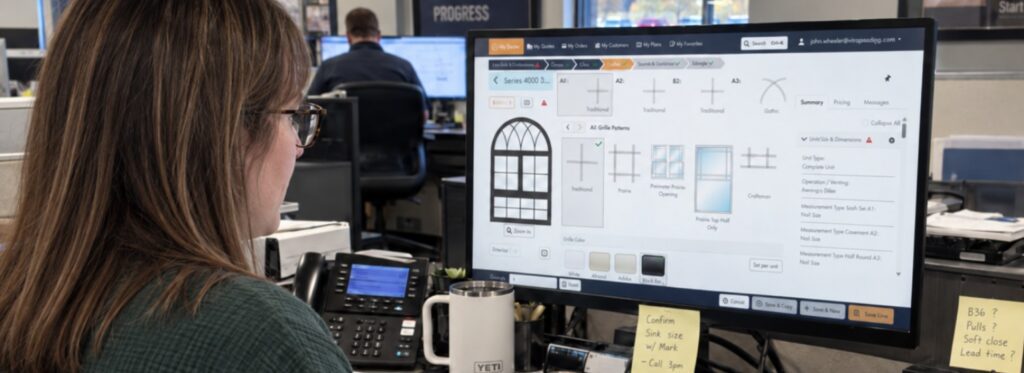
Once upon a time a manufacturer was comparing two CPQ platforms. One has a long list of capabilities, extra settings, and plenty of ways to customize the process. They thought “Wow! This is going to be great! Let’s get the one with all the options so we can maximize our utilization”. On paper, it seemed like the obvious choice. More means more, right?
But months after launch, dealers are still emailing orders, reps are still checking spreadsheets, and customer service is still fixing configurations before they reach production. The platform had the features. What it did not have was a process people wanted to use.
More really did mean more. More time spent, more steps in the process, more back-and-forth. And ultimately, it also meant more sales lost.
When manufacturers evaluate CPQ software, it is natural to ask what the system can do. But the better question is simpler: can someone get from a customer request to an accurate quote without getting stuck?
That is where friction shows up. Every extra click, handoff, or workaround slows the sale down.
The Feature-List Trap in CPQ Buying
Feature comparisons have their place. Manufacturers need to know whether a platform can support their products, pricing, integrations, and sales channels.
The problem starts when buyers treat the longest feature list as the safest choice.
Features that rarely get used still have a cost. They add screens, settings, permissions, workflows, and training, which can make the system harder to maintain and harder for users to trust.
What gets compared in the buying process
Evaluated once, on a spreadsheet
- Total number of capabilities
- Settings and customization options
- Integration checkboxes
- Coverage for every hypothetical scenario
What your team lives with afterward
Experienced every day, by everyone
- More screens and permissions to maintain
- Longer training for occasional users
- More decisions per quote
- A system people trust less, and route around
That matters even more for building products manufacturers that sell through dealers and contractors. Internal teams may use CPQ every day, but a dealer may only log in once or twice a week.
If quoting feels slow or confusing, people find another way. They go back to spreadsheets, PDFs, emails, or phone calls because those tools feel faster.
The best CPQ software for manufacturers makes the correct process the easiest process to follow.
What Friction Actually Costs a Building Products Manufacturer
Friction is anything that makes it harder than it needs to be to move from a customer inquiry to an accurate order.
Sometimes it is obvious, like duplicate data entry. Other times it is smaller: one extra field, another screen, or an approval email that interrupts the flow.
If quoting takes too long, dealers and contractors may lose jobs to competitors who can provide accurate pricing faster. If details have to be re-entered after the quote, errors can lead to corrections, remakes, and jobsite delays.
Friction also leads to workarounds. Users save old price lists, keep their own spreadsheets, or call the person who always has the answer. That may solve the immediate problem, but it makes pricing harder to control and quoting activity harder to see.
Even small delays become expensive at scale. The reverse is also true, which is why a step you never have to take is worth more than a feature you rarely use.
Why “More Features” Often Means “More Friction”
Every feature adds something for someone to manage: settings, permissions, exceptions, training, or one more decision for the user to make.
That does not mean fewer capabilities are always the answer. It means every capability should make the process simpler, clearer, or faster for the people using it.
This is especially important with manufacturing CPQ software for windows, doors, cabinets, and other configurable building products, where options can span dimensions, materials, colors, glass, hardware, finishes, and performance requirements.
Constraint-based configuration helps by moving that complexity into the system. Instead of expecting a dealer to remember which options work together, the software guides them toward a product that can actually be built.
Good CPQ software does not make users deal with complexity just because it exists. It handles as much of that complexity as possible in the background.
What Step-Removal Looks Like in Practice
Removing friction means keeping important controls while building them into a workflow that feels easier to follow.
Guided selling
Users find the right products without searching through a catalog.
Visual configuration
The product changes as selections are made, so users can catch issues earlier.
Automated pricing and rules
Standard business logic applies without forcing users to request approval on routine orders.
Quote-to-order continuity
Information keeps moving downstream instead of asking teams to re-enter the same details in another system.
Think about a common sales process.
Without a connected workflow, a contractor may take measurements, look up product options, request pricing, email a proposal, revise the quote, and then manually create the order once the customer approves it.
With a guided workflow, that same contractor can configure valid products, see current pricing, present the project, and generate an accurate quote during the appointment. If the customer moves forward, the quote can become an order without starting over.
Without a connected workflow
6 steps, spread across days
With a guided workflow
4 steps, inside one appointment
Same contractor, same products. The difference is how many steps sit between the measurement and the order.
How to Evaluate CPQ Through a Friction Lens

The next time you sit through a CPQ demo, try shifting the conversation.
Instead of asking a vendor to show every feature, ask for the fastest path from customer request to accurate quote and order entry.
Then look closely at what happens along the way:
-
Count the steps
Compare clicks, screens, and manual handoffs with your current process.
-
Test a new user’s experience
Ask how long it typically takes a new sales rep or dealer to produce their first accurate quote.
-
Try a difficult configuration
Use a real edge case and see whether the system guides the user or requires outside help.
-
Look for duplicate entry
Identify where customer, product, measurement, and pricing information must be entered more than once.
-
Ask what the system prevents
Avoiding invalid configurations, pricing errors, and unauthorized discounts can be as valuable as adding functionality.
-
Evaluate external-user simplicity
Make sure occasional users can complete the workflow without retraining.
This is not about choosing features or avoiding them. Manufacturers need sophisticated capabilities because their products and sales channels are complex.
The better question is whether each capability removes work from the process or adds more of it.
Finding the Best CPQ Fit for Your Business
For building products manufacturers, the best measure is not how many features a system claims to have. It is how many unnecessary steps it removes, how quickly people can create accurate quotes, and how well it catches problems before they reach ordering or production.
That takes powerful technology, but it also takes a system designed around how manufacturers, dealers, and contractors actually work with customers.
Paradigm’s guided selling approach helps simplify complex product configuration, centralize pricing and business rules, and give teams a clearer path from the first conversation to an accurate order.
See how short the path from configuration to order can be.
Request a demo to see how Paradigm can help your team shorten the path from product configuration to quote and order without adding unnecessary complexity.
Latest Blog Posts
Friction vs. Features: Why Removing Steps Beats Adding Features in CPQ Software
Feature lists don't win quotes, but speed does. Cutting steps from your

CPQ vs. Platform: Why Paradigm Omni Is a Revenue Platform, Not Just a CPQ Tool
Comparing CPQ software? Learn the difference between a quoting tool and a

Signs You’ve Outgrown Spreadsheets for Quoting
Slow quotes, pricing errors and unbuildable orders can signal you've outgrown spreadsheets.